Transitions, Not Tasks: Designing AI for the Gap Between Meetings
The few minutes between one meeting and the next are where a lot of knowledge work goes wrong. You are still carrying what just happened while trying to load what comes next, and the commitment you made last week to the person you’re about to see is buried in an email thread you won’t find in time. Most AI assistants don’t help here, because they wait to be asked, and nobody thinks to ask in those few minutes.
I wrote about the human side of this last month in Six Short Meetings, One Lost Day: what the interruption research says and the calendar rules I use. This post is the system-design side. If you were building an agent whose job is the transition rather than the task, what would it need to do, what can you build with today’s Microsoft stack, and where should you stop?
Sizing the tax honestly
The figure people usually quote is “23 minutes to refocus after an interruption”, attributed to Gloria Mark’s group at UC Irvine. Their CHI 2005 paper, No Task Left Behind?, reported that interrupted work was typically resumed after around 25 minutes, with other activities in between. That is time until people returned to a task, not a fixed penalty per interruption, so any cost model built on it is a rough estimate.
With that caveat, a simple model still makes the point. Assume each meeting costs 10 to 25 minutes of reload time:
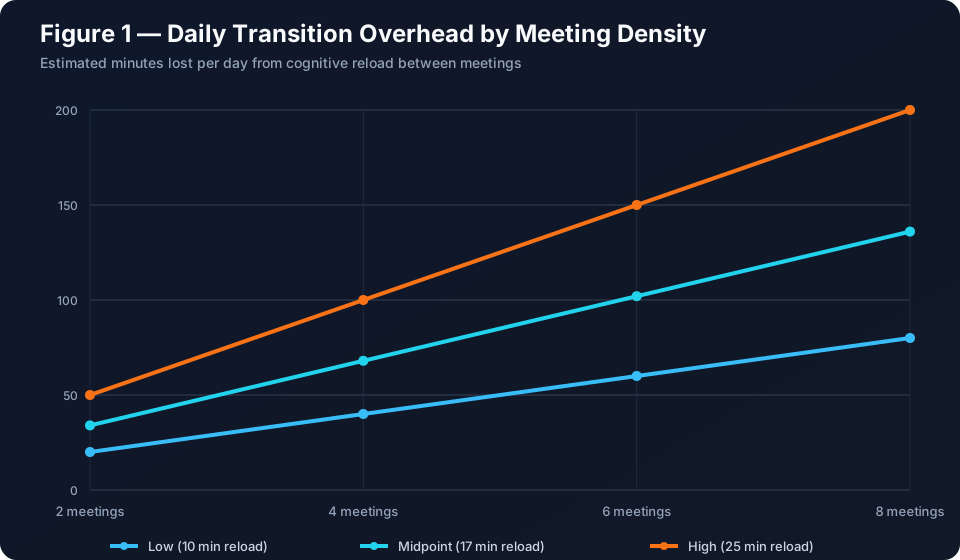
Rounding down to 15 minutes to stay conservative gives a flat 90 minutes a day across 235 working days. At a loaded cost of US$150 an hour, that’s about $52,900 a year per person in capacity that doesn’t show up on any report. I don’t put much weight on that number. What matters is where the time goes: reconstructing context, rereading threads, and opening a meeting with “remind me where we landed last time”. That work is repetitive and draws on data already sitting in mail, calendar, chat and files, which is exactly the kind of work worth automating.
Why task assistants miss it
Every tool in the stack holds part of the picture:
| Tool | Knows | Misses |
|---|---|---|
| Calendar | When the transition happens | What matters in it |
| Mail and chat | What was said | Which of it is still open |
| Notes and CRM | Some of the context | Nobody retrieves it at the right moment |
| Chat assistant | Can synthesise anything | Waits for a prompt |
Each tool is organised around its own data model, not around your commitments and the moments they become active again. A chat assistant can produce an excellent pre-meeting brief, but only if you remember to ask, two minutes before the call, while you’re still finishing the last one.
For transition work, the trigger shouldn’t be a user prompt. It should be the state of the world, such as a meeting starting in 15 minutes, a meeting that just ended, or a promised date that’s two days away.
What already exists (as of March 2026)
I’d start with what’s already there before building anything:
- Copilot in Outlook meeting prep. Microsoft 365 Copilot can prepare you for a meeting from the calendar event, summarising related emails and files and the previous occurrence. It needs a Microsoft 365 Copilot licence.
- Facilitator in Teams. Facilitator takes notes and tracks action items during a meeting. It is generally available for scheduled Teams meetings and needs a Microsoft 365 Copilot licence; task management is still in preview.
- Copilot Studio event triggers. Autonomous agents with event triggers are generally available. An agent can wake on an event, such as a new email or a changed record, and decide what to do. Triggers require generative orchestration, and every firing is billed in Copilot Credits, so a recurrence trigger every 10 minutes costs money even when nothing happens.
- Meeting AI insights API. Since December 2025, Microsoft Graph v1.0 can return Copilot’s notes, action items and mentions for a Teams meeting (
aiInsightson/copilot/users/{userId}/onlineMeetings/{meetingId}, permissionOnlineMeetingAiInsight.Read.All), with change notifications when a summary is ready. Every user needs a Microsoft 365 Copilot licence, and the meeting must be transcribed. - Microsoft Graph change notifications. For a custom build, change notifications on calendar events and messages are the underlying plumbing, and they have been around for years.
Taken together, the before and during parts are reasonably covered. What’s still mostly missing is the loop: carrying a commitment captured in Tuesday’s meeting into the brief for Friday’s meeting with the same person, and noticing when it’s slipping.
The closed transition loop
A transition agent is a loop, not a single summary:
- Detect an upcoming interaction from the calendar.
- Brief from live context, with open commitments at the top.
- Capture decisions and commitments as the interaction ends.
- Update memory so the next transition with these people starts from where this one finished.
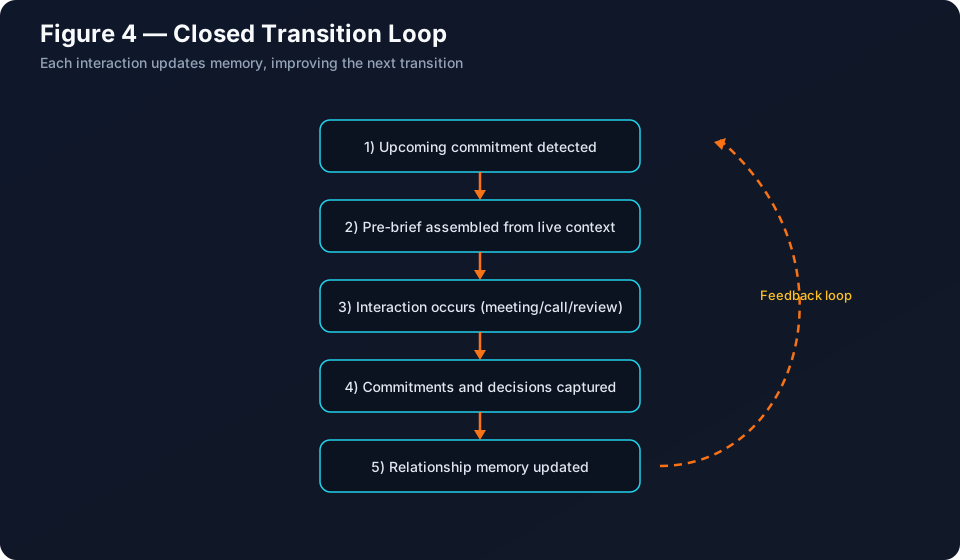
Steps 1 and 2 are what Copilot meeting prep already does. Step 3 is roughly what Facilitator and Copilot’s meeting recap do. Step 4 is where the payoff and most of the risk sit.
If you build it
Step 4 is the part you’d have to build, so here’s the shape I’d start with:
- Commitment store. A Dataverse table with one row per commitment: owner, counterpart, description, due date, status, and an evidence link back to the transcript, message or file it came from. Dataverse gives you record- and column-level security, auditing, and a model-driven app for review and correction without writing a UI.
- Detection. A Graph subscription on
/me/eventscatches new and rescheduled meetings, but change notifications don’t fire when a meeting is about to start, so add a scheduled check every few minutes that queriescalendarViewfor meetings starting in the next 15 minutes. Subscriptions also expire (10,080 minutes for basic Outlook notifications, 1,440 if you include resource data), so something has to renew them. In Copilot Studio, the Office 365 Outlook connector’s “When an upcoming event is starting soon (V3)” and “When an event is added, updated or deleted (V3)” triggers cover the same ground. - Capture. Where users have Copilot licences, subscribe to AI insights notifications and treat Copilot’s action items as candidate commitments. Fall back to the transcripts API and your own extraction for unlicensed users or when you need control over the extraction prompt. Transcripts need the
OnlineMeetingTranscript.Read.Allpermission, and both paths need transcription on. Facilitator’s live notes have no documented export API, but Copilot’s recap insights do. Write candidates as “proposed” rows that the user confirms or rejects. - Brief. When detection fires, look up open commitments where the counterpart is on the invite, and put those at the top of the meeting brief.
I’d build this in Copilot Studio first: the triggers, connectors, Dataverse and governance are already there, and an agent that stays inside your Power Platform environment strategy is easier to get past security review. A custom build on Graph and Azure OpenAI is the better choice when you need per-user delegated permissions instead of the author’s credentials, or a volume where Copilot Credits consumption gets expensive. Capture is then a choice between Copilot’s insights and your own extraction from transcripts. Insights are less to build but need a Copilot licence for every user and give you Copilot’s idea of an action item. Your own extraction covers unlicensed users and lets you control the prompt and which model sees the transcript, but you own its quality.
Design principles I’d hold to
Make commitments the primary object. Store “Sam asked for the cost estimate by Friday; I said yes” as a record with an owner, a counterpart, a due date and a link to the evidence. A brief that leads with three open commitments is more useful than one that summarises 40 emails.
Deliver on timing, not on request. A brief that arrives 10 to 15 minutes before the meeting is useful. One that arrives an hour early gets buried, and one that arrives at the start of the meeting is too late. Post-meeting capture should land before the next meeting starts.
Keep capture close to zero effort. If people have to log commitments by hand, the system fails within a fortnight. Extract them from transcripts and mail, and ask the user to confirm or reject. Don’t make them type.
Ground every claim. Each line in a brief should link back to the message, file or transcript it came from. A confidently wrong “the client is unhappy about the timeline” is worse than no brief at all.
Make memory visible and editable. People need to see what the agent remembers about a relationship, correct it, and delete it. If they can’t, they won’t trust it, and in a client-facing role they shouldn’t.
Measuring whether it helps
“People liked the brief” doesn’t tell you much. I’d measure:
- Commitment completion rate: promises made versus promises kept on time.
- Follow-up latency: time from meeting end to the first follow-up action.
- Context reconstruction time: minutes spent searching mail and notes before a meeting, sampled with a short self-report.
- Repeated debates: decisions that get reopened because nobody remembered they were made.
If the commitment completion rate doesn’t move, the agent is generating text, not reducing load.
Where I’d be careful
This category has sharper risks than a chat assistant, because it runs without being asked and builds memory about people.
- Over-collection. Scope integrations to calendar plus the mail and chat threads tied to those meetings. Don’t index everything because you can.
- Inference about people. “Detecting tone changes” in a counterpart sounds clever and gets uncomfortable quickly. I’d keep the agent to facts and commitments and leave the reading of the relationship to the human.
- Identity and permissions. Microsoft’s guidance on adding an event trigger warns that triggers authenticate with the agent author’s credentials, which can expose data to users who aren’t authorised to see it. A transition agent touches some of the most sensitive data in the tenant, so get the identity model right before you think about prompts.
- Transcription and consent. The loop only works if transcription is on, which is a policy and consent decision for each meeting, not a technical setting you can quietly flip for everyone.
- Retention. Set explicit retention windows for relationship memory and align them with your records policy. “Forever” is not a retention policy.
And when not to build this at all: if your meetings are mostly internal stand-ups with no external commitments, the loop has little to carry, and calendar discipline from the previous post will do more for you.
The takeaway
Turn on meeting prep and Facilitator, measure commitment completion for a month, and build the memory layer only if that number doesn’t move. If you do build it, the plumbing is ready (event triggers, change notifications, meeting insights and transcripts); what decides whether it works is what it remembers, when it speaks up, and whose credentials it acts with.