Haiku 5.5 vs Opus 5.5 on Real Repo Chores in Claude Code
TL;DR: I ran Claude Haiku 5.5 and Claude Opus 5.5 through the same five chores in this blog’s own repository, twice each, headless. Both models passed all ten of their runs. Haiku cost US$0.11 in total and Opus cost US$2.88, at about the same wall-clock time. Opus earned its price in the quality of the diff, not in whether the job got done.
Anthropic released Claude Haiku 5.5 on 7 October at US$0.10 per million input tokens and US$0.50 per million output tokens for prompts up to 100,000 tokens. Opus 5.5 lists at US$4 and US$20 on the pricing page. That’s a 40 times gap per token. Benchmarks tell you how a model does on someone else’s tasks. I wanted to know whether Haiku can take the boring repo work I’d normally hand to Opus without thinking.
The setup
The repository is the one that builds this site: an Astro project with about 2,200 Markdown posts and a small content linter. I picked five chores that look like real maintenance, each with a checker that decides pass or fail without me reading the output.
| Chore | What the prompt asked | How the checker decides |
|---|---|---|
t1-crlf | The content linter fails on every post on this Windows checkout. Find the root cause and fix the script. | Linter exits clean, and no post changed |
t2-link | One September post links to a /blog/ URL that matches no file. Fix it. | File is byte-identical to the committed version again |
t3-tag | The linter fails with a tag spelling error. Fix the odd post out. | Linter passes, and only that line changed |
t4-script | Write a Node script that prints the ten most used tags with counts. | Output matches my own count of the frontmatter |
t5-series | Build a JSON index of the ten-part data engineering series from git history. | Slugs, dates and order match exactly |
The first chore wasn’t planted. When I ran the linter before starting, it reported “missing frontmatter” for all 2,205 posts. Git’s core.autocrlf gives this checkout CRLF line endings, and the linter’s frontmatter regular expression only expects \n. I kept it as a task because it’s the kind of bug that eats half an hour. The other four had a seed applied to a clean copy before each run: a broken link, a lowercase claude tag, or nothing at all for the write-a-thing tasks.
Each model ran in two lanes, and each lane had its own pair of git worktree copies, reset with git reset --hard and git clean before every chore, so no run could see another’s edits. Chores 2 to 5 ran on a copy with the line-ending fix already committed, so the linter worked for them. Each run was one claude -p call with the same flags:
claude -p "<chore prompt>" --model haiku --output-format json \
  --max-budget-usd 2 --permission-mode acceptEdits \
  --allowedTools "Read Edit Write Glob Grep Bash(node:*) Bash(git:*) Bash(ls:*) Bash(cat:*) Bash(grep:*) Bash(find:*) Bash(head:*)"
Swap haiku for opus for the other arm. I didn’t pin the effort level with --effort in this batch. Opus picked up the high level saved in my settings, and Haiku ran at whatever level its environment gave it, which the logs don’t record. So read this as each model as configured on my machine, not a comparison at equal effort. The JSON result carries total_cost_usd, num_turns and per-model token usage, which is where every number below comes from. I checked modelUsage in each result to confirm the runs actually used claude-haiku-5-5 and claude-opus-5-5.
Watching Haiku fix a real bug
After the batch, I reran the line-ending chore on Haiku where I could watch it, with a narrower allowlist: the file tools plus node and git. The screenshot below shows the full run, streamed from --output-format stream-json through a small script that prints each tool call as it happens.
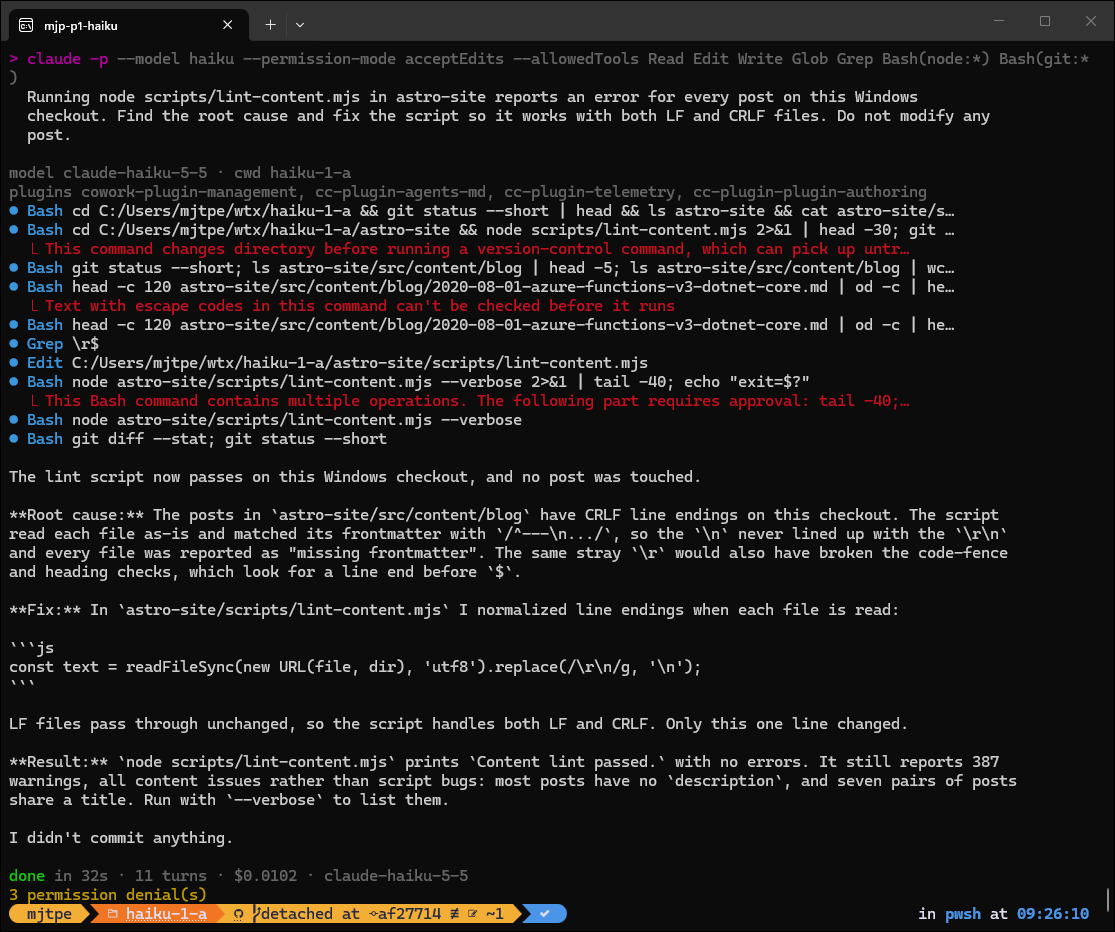
Three things in that run were worth noticing. Haiku hit my permission rules three times: once for running git after a cd, once for a command with escape codes, and once for a pipe. Each time it rephrased the command and carried on, rather than stopping to ask. It confirmed the CRLF theory with od -c before editing anything. And it noticed that the stray \r would have broken the code-fence and heading checks too, not only the frontmatter match. That’s the right diagnosis for one cent.
The results
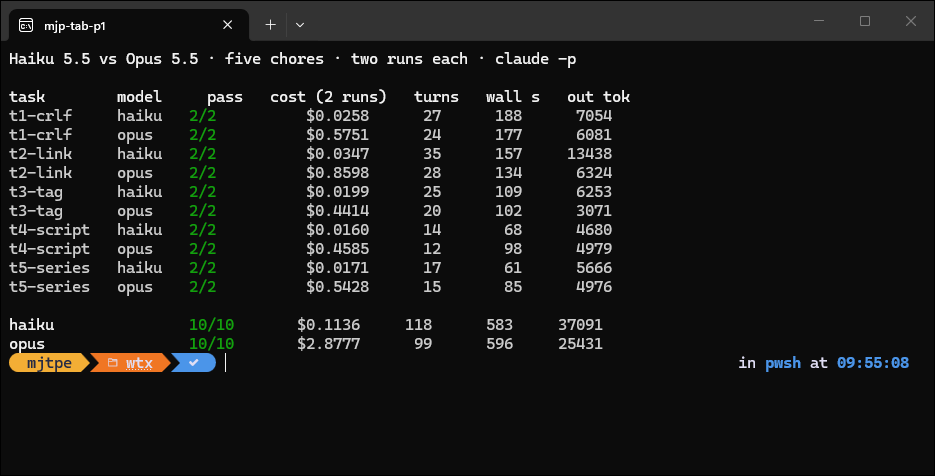
| Model | Passed | Cost | Turns | Wall-clock (summed) | Output tokens |
|---|---|---|---|---|---|
| Haiku 5.5 | 10 of 10 | US$0.11 | 118 | 583 s | 37,091 |
| Opus 5.5 | 10 of 10 | US$2.88 | 99 | 596 s | 25,431 |
Pass rate didn’t separate them at all. My first reaction was that the tasks were too easy, and partly they were. But “too easy for Opus” is exactly the category I’m trying to find, because that’s where I’m overpaying.
Two numbers did move. The cost gap is about 25 times, not the 40 times the price list suggests. Haiku took 19% more turns and wrote 46% more output tokens to get to the same place. On the broken-link chore, one Haiku run took 26 turns where the other took 9. It checked every internal link in September by hand after four of its commands were refused. Haiku takes more steps, so some of its per-token saving goes back into them.
Wall-clock time was a wash. Whatever Haiku saves per step, it spends on the extra steps, and each step includes tool round trips that take the same time whichever model asked.
Where Opus earned its price
The pass column hides the differences, so I read the diffs. On the line-ending fix, both Haiku runs wrote this:
const text = readFileSync(new URL(file, dir), 'utf8').replace(/\r\n/g, '\n');
Both Opus runs used a broader regular expression with a comment explaining it. One wrote this:
// Normalize CRLF (e.g. Windows checkouts with core.autocrlf) so the LF-based patterns below match.
const text = readFileSync(new URL(file, dir), 'utf8').replace(/\r\n?/g, '\n');
The \r\n? also handles a lone carriage return, and both Opus comments tell the next person why the line exists. Neither difference affects whether my checker passes. Both matter six months from now, when someone deletes a line they don’t understand. Opus was also more economical: it wrote fewer output tokens than Haiku on four of the five chores, and on the tag fix it used half as many.
What this test doesn’t tell you
- Two runs per cell is a smoke test, not a benchmark. It’s enough to show both models can do this work. It isn’t enough to put a failure rate on either.
- The effort levels weren’t equal. Opus ran at
highfrom my settings, and I didn’t pin Haiku’s level. A run with both models at the same--effortmight narrow or widen the gap. - The chores are well specified. Each prompt said what was wrong or what to produce. Vague asks (“tidy up the tags”) are where I’d expect the gap to open, and I didn’t test them.
- The dollar figures are list API prices. The
total_cost_usdfield reports what the run would cost on the API. On a Pro or Max plan you pay in usage limits, not per token, but the ratio is still a fair proxy for how fast each model eats them. - Haiku 5.5 has its own price step. Prompts over 100,000 tokens cost five times more. I saw nothing suggesting any of my runs crossed that line, but a long agent session with a big context could.
What I’m changing
- Mechanical repo chores go to Haiku by default. Lint fixes, link repairs, small scripts and data extraction from git history all passed every time, for about a cent each.
- I’ll keep Opus for code someone will maintain. The extra comment and the more defensive regular expression are what I’d ask for in review anyway. Paying for them up front is cheaper than a review round trip.
- Permission rules shape the path. Haiku’s 26-turn link fix came after four refused commands, against nine turns in the run that had none. Opus hit my allowlist too, but recovered in fewer steps. If you move cheap work to a smaller model, give it a tool list that matches the job, or it’ll spend the saving on detours.
- Measure turns, not just tokens. A per-token price says nothing about how many tokens a model needs. Run your own chores through both models once, read the diffs, and decide from there.