Turning a Blog Post into a Deck with Claude Slides
TL;DR: Claude’s Slides left beta on 8 October. I gave a fresh Claude Code agent one of my posts and an empty deck, and five minutes later it had built nine slides with speaker notes. I then checked every claim on every slide against the post. I found no invented statistics, quotes or recommendations. What I did find was smaller: straight apostrophes everywhere, two slides carrying more text than a slide should, and a cover that quietly drops one of the five tools the deck is about.
Most of what I write here ends up as a talk or a briefing at some point, and rebuilding a post as a deck is the dullest hour of that process. Anthropic’s Dashboards and Motion announcement also moved Docs, Slides and Design out of beta and onto every Claude plan, including Free. So the question I wanted answered wasn’t “can Claude make slides”. It was whether I could hand a deck built from my own writing to a security team without reading every word first.
The setup
The source was my August post on Claude’s server-side tools in Foundry. It’s dense: five capabilities, a table of what leaves your network boundary, code samples and a decision at the end. That makes it a good test, because a deck has to cut most of it.
I didn’t build the deck in my own session. Grading slides I’d written myself would prove nothing, so I started an empty deck from the Slides type and handed the work to a separate Claude Code subagent. It got the post’s file path, the deck link and a short brief:
- The audience is an Azure platform or security team deciding which server-side tools to allow.
- Aim for seven to nine slides, with speaker notes on each.
- Use only what the post says: no added statistics, quotes, product claims or recommendations.
- Don’t render or re-check the deck after publishing.
The agent read the post, read the Slides type’s instructions and published. It took 23 tool calls and about five minutes.
What a Claude deck actually is
This part surprised me, and it’s the part I like most. Built from Claude Code, a Slides deck isn’t a binary file. It’s a small set of text files: a deck.json index with the title, slide order, outline sections and fonts, plus one HTML file per slide. Each slide is a single <section> on a fixed 1920 by 1080 canvas. Every style is inline, from a closed subset of CSS: pixel lengths, flex and grid layout, hex colours, no classes and no scripts.
{
  "v": 4,
  "title": "Claude's Server-Side Tools in Foundry",
  "order": ["cover", "problem", "azure-limits", "tools-table", "no-egress", "web-risk", "web-rule", "mcp", "decision"],
  "sections": {
    "s1": { "description": "Why a server-side tool changes the egress picture for Azure-hosted Claude.", "start": "cover" },
    "s2": { "description": "The five tools, sorted by what leaves your boundary.", "start": "tools-table" },
    "s3": { "description": "Per-tool guidance: no-egress tools, web search and fetch, and the MCP connector.", "start": "no-egress" },
    "s4": { "description": "The decision on which tools to allow.", "start": "decision" }
  }
}
That’s the deck’s real index, trimmed to the keys that matter here. Because slides are plain files, the agent’s output can be read, grepped and diffed like code. That’s how I audited it.
The deck
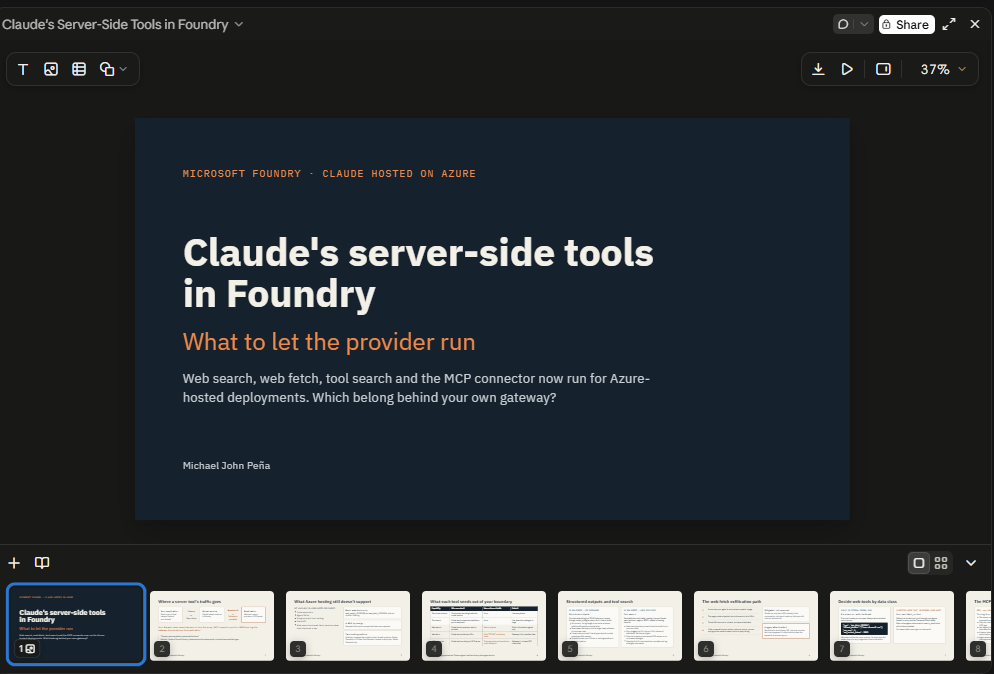
The screenshot is the real viewer in the Claude desktop app, with the cover open and the other slides in the filmstrip. I audited the rest from the slide files rather than screenshots.
The agent’s structure was better than the one I’d asked for. It added a slide on what Azure-hosted deployments still don’t support, which the post covers in one paragraph and which a security team will ask about first. It also split web search and web fetch into two slides, one for the exfiltration path and one for the rule. The five-tool table came through intact as a real table, not an image. The colour coding was sensible too: orange for tools that send data out, blue for tools that don’t.
The audit
I pulled the text and speaker notes out of all nine slide files and checked each statement against the post.
| Check | Result |
|---|---|
| Statistics, quotes or product claims not in the post | None |
| Recommendations not in the post | None |
| Quotes attributed correctly | Yes: “Prompts and completions remain within Azure” is credited to Anthropic’s Foundry page, as in the post |
| Details lost that change the meaning | One: the cover lists four of the five tools and drops structured outputs |
| Speaker notes | On all nine slides, close paraphrases of the post’s own paragraphs |
The speaker notes are the most useful part. They’re the post’s argument in a form you can read aloud, and they keep the caveats the slides had to cut. For example, structured outputs guarantee the shape of a value but not its range. The agent also switched the notes to “we” and “our”, since a team would present them, which was a sensible call that nobody asked it to make.
The misses were all presentation, not substance:
- Straight apostrophes throughout. The Slides type’s font reference, which the agent reads before building, asks for typographic quotes and apostrophes in everything people read. The deck has 38 straight apostrophes, 12 on the slides and 26 in the notes, and no curly ones. It’s minor, and it’s exactly the kind of thing a designer would catch in five seconds.
- Two text-heavy slides. On the structured outputs and tool search slide, each card has a lead sentence and four bullet points, and the data-class slide includes a code fragment. Both read fine as handouts and would be too much on a projector.
- The cover drops a tool. The line under the cover title names four tools, “web search, web fetch, tool search and the MCP connector”, and leaves out structured outputs. It mirrors my own post’s description, but the deck is about five capabilities, and the first one a reader meets is missing.
What I’d do with it
- Yes, I’d hand this to a security team, after a ten-minute pass on the two dense slides and the cover line. That replaces most of the hour I’d spend rebuilding it by hand.
- Ask for a fixed brief. “Use only what the post says” did its job: nothing invented appeared. If I’d asked for a “compelling” deck, I’d have expected it to reach for a statistic.
- Have someone other than the author build it, even if that someone is Claude. A separate agent with only the post and the brief is a fair test of whether the writing stands on its own, and it’s an easy way to see what a reader takes away.
- Audit the files, not the pixels. A deck kept as text means you can check claims with the tools you already use for code. That’s how I’d review any agent-built deck before it goes out.
- Remember it’s private until you share it. Anthropic’s help article on artifacts says they start private to you. People only see the deck once you share it from its Share menu, and it exports to PowerPoint, PDF or Google Slides when someone needs a file.
The deck didn’t replace the post. It’s a good second form of it, built in five minutes, with errors I could find by reading text files.