Claude Code's Monitor Tool vs Polling: What Actually Happened
TL;DR: Claude Code’s Monitor tool streams a background command’s output back to Claude so it can react mid-task, and last week’s release brought it to Bedrock, Vertex and Foundry. I ran two watch-and-react tasks on Opus 5.5, with Monitor allowed and with it switched off. Both arms got every answer right in similar time, partly because Claude used Monitor inconsistently even when it could. The bigger lesson was about headless runs: claude -p can answer more than once, and the JSON output keeps only the last answer, which wasn’t the one I needed.
Monitor runs a command in the background and feeds each line of output back to Claude as an event. The changelog for version 2.1.310, released on 23 October, makes it available on Bedrock, Vertex and Foundry, and in sessions with telemetry or non-essential traffic turned off. If you run Claude Code through Foundry, as many Azure shops do, last week is when Monitor became an option. I wanted to see what it changes in practice.
Two tasks
A build that fails partway. A stand-in build script prints a progress line every three seconds and hits an ERROR at about 45 seconds. Then it keeps going until about 150 seconds and exits with code 1, just as a real site build keeps rendering after the first broken page. The prompt: run the build, and as soon as it prints a line containing ERROR, report that exact line and stop, without waiting for the build to finish. The script logs its own timings, so I could measure the gap between the error appearing and Claude reporting it.
A process that never exits. The real dev server for this blog. The prompt: start it with npm run dev, leave it running, and as soon as it’s ready, request /blog/ and report the status code and how long startup took.
Each task ran headless on Opus 5.5 in two arms: Monitor allowed, and --disallowedTools Monitor. The build-log runs ran six at a time, each in its own folder. The dev-server runs went one at a time, each in a Windows job object, so cleanup killed only the processes that run had started.
What a headless Monitor run looks like
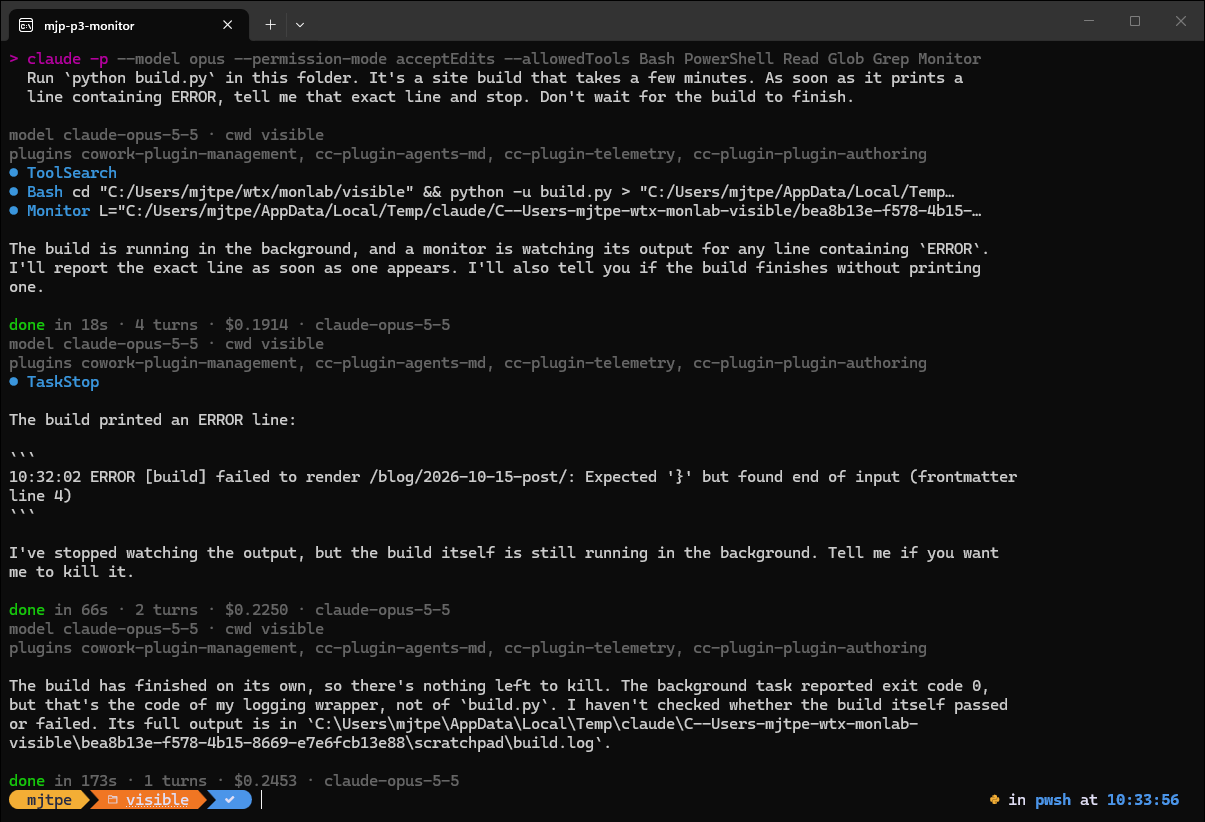
That screenshot taught me more than the batch did. The run answered three times. At 18 seconds, it said it was watching. At 66 seconds, the Monitor event woke it and it reported the error line, which is the answer I asked for. At 173 seconds, it answered again because the background build had exited.
That’s documented behaviour. The headless docs say a claude -p run waits for background work it started, and takes another turn when that work finishes. They also say the default text output prints each turn’s result, while --output-format json prints only the last one. My first batch script read only the last result. It scored one Monitor run as a two-minute failure that never reported the error, when the run had reported it on time in an earlier answer my script threw away. I rewrote the harness to keep every result and reran the batch. The numbers below come from the rerun.
The results
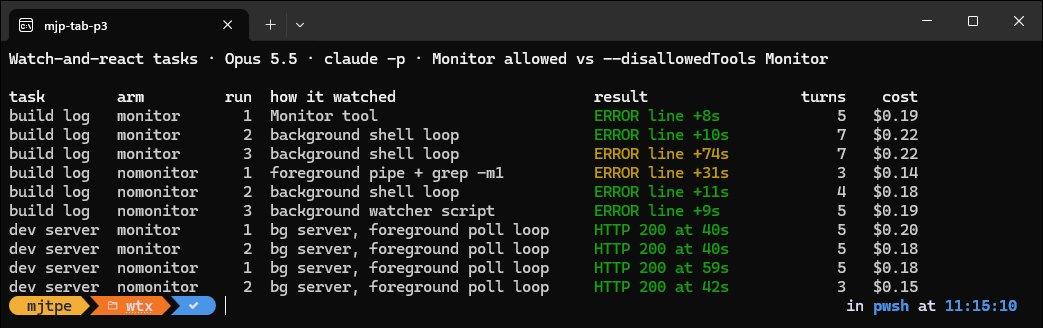
| Task | Arm | Reported after the error, or answered at | How Claude watched |
|---|---|---|---|
| Build log | Monitor allowed | 8 s, 10 s, 74 s | Monitor once, background shell loop twice |
| Build log | Monitor off | 31 s, 11 s, 9 s | foreground grep -m1 pipe, background loop, background watcher script |
| Dev server | Monitor allowed | answered at 40 s, 40 s | server in the background, foreground readiness loop |
| Dev server | Monitor off | answered at 59 s, 42 s | server in the background, foreground readiness loop |
Every run got the right answer: the exact error line, or HTTP 200 with a startup time of five to six seconds. The first request to /blog/ took about 19 seconds, because Astro’s dev server builds each page on first request and this blog has about 2,200 posts behind that index.
The “how” column is the interesting part. Claude’s use of Monitor was inconsistent. In my first batch, the one whose scoring I had to throw out, all three Monitor-arm runs used it. In the rerun, one of three did on the build log, and neither dev-server run did. Counting the screenshot run, Claude used Monitor in five of nine runs where it was allowed. When it didn’t, it wrote its own watcher: a background shell job that looped on grep with one-second sleeps until the line appeared, then exited. That’s essentially Monitor, built by hand.
Two numbers need explaining, and the transcripts explain both. The slow Monitor-arm run, at 74 seconds, used one of those hand-rolled loops, and each pass also checked whether the build process was still alive. The loop didn’t exit until 67 seconds after the error. Claude answered within seconds of being notified, so the delay was in the watcher, not in Claude. The 31-second no-Monitor run is the opposite case: its grep -m1 pipe returned seven seconds after the error, and Claude then spent the rest checking for leftover build processes before it answered.
The sleep block points two ways
Claude Code also refuses a long sleep in the foreground. To see it, I asked Haiku 5.5 to wait two minutes with sleep 120.
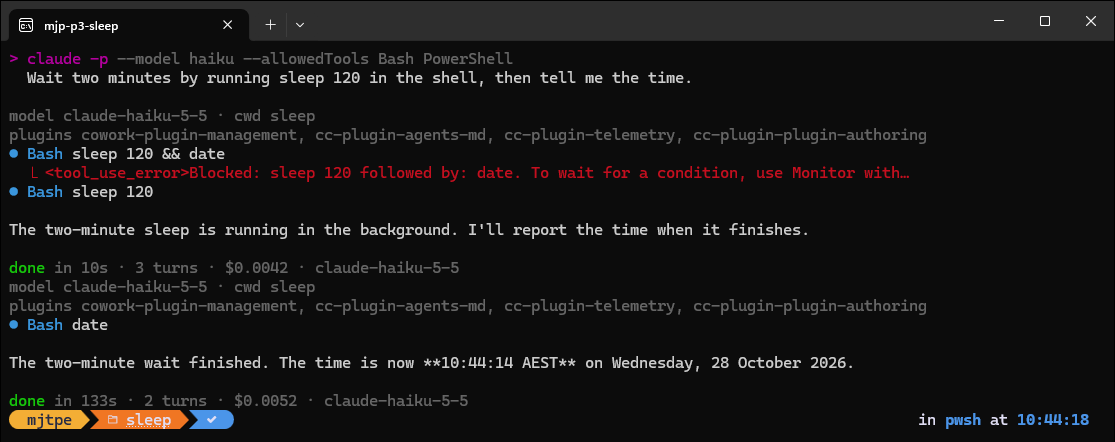
The block message offers two routes: use Monitor to wait for a condition, or run the command in the background if you’re waiting for something you started. Haiku took the second route, ran sleep 120 in the background, and the headless run waited and answered again at 133 seconds. That’s reasonable, since I asked for a sleep, not a condition.
What I’m taking from this
- For headless runs, read every result. If Claude might start background work, use
--output-format stream-json --verboseand keep everyresultevent, or tell Claude in the prompt to stop its background work before it answers. With plainjsonyou get only the last turn, which may be an “it finished” note rather than the answer you asked for. - Bound the wait. A headless run that starts a dev server stays open until the server exits or hits its background time limit, which the docs put at 10 minutes for a
-prun given a text prompt. My first dev-server harness had no timeout of its own and sat waiting until I stopped it. Put your own timeout around unattended runs. - Ask for Monitor if you want it. Allowing a tool isn’t the same as Claude using it. If you specifically want event-driven watching, say so in the prompt. Otherwise expect a serviceable shell loop about half the time.
- On Foundry, it’s still a real upgrade. Before 2.1.310, Claude Code didn’t offer Monitor on Foundry. If your team runs Claude Code through Foundry for data residency, interactive sessions can now watch a build and keep working instead of blocking on it. That’s where I’d expect Monitor to matter most: in a long interactive session, not a two-minute scripted check.